Monday

So you want to Start a Blogging


Hello, there!

Today I am going to start a series on some questions that are asked often in the blogging community.

Starting a blog is easy, it just takes a few clicks here and there, but I am going to take you behind the scenes and show you some stuff I learned through trial and error without going through the time consuming mistakes.

I do feel this subject is a lot better explained through verbal communication, so let go!


Thanks for Visiting, If you liked this post please Like & Share. Please Leave me a comment it lets me know you're there, leave your link behind :) Don't for forget to follow this blog! Follow on Bloglovin

Friday

12 Things I learned in 8 months of Blogging.


Okay, so I have been here for a while on the interwebs in the blogosphere and I think I learned some stuff, not much but enough to cover the law and call myself a blogger. Some people say I have accomplished a lot in my short time, however I feel different, like I haven't accomplished enough.

Maybe thats just me, I tend to dive into things and what to absorb every aspect of it in the shortest amount of time. I have many different passions within my life, but blogging is on a whole other level. I wanted to blog since, well a long time around 7 or 8 years ago, but life had other plans for me. So here I am all blogged out with three blogs to manage, one of which is a blog I write on when I am angry with my husband, but as you can see isn't very often. So on to this post.

12 Things I learned in 8 Months of Blogging.


1. No one in your personal life will understand why you blog.

Your family and friends will all ask " why do you blog?" and my favorite "have you made any money yet?!"
Don't do it for no one else but yourself.

2. There are people out there.

Once you find your niche you will come to find out there are a bagillion other people doing the same exact thing you're doing, so sticking out like a sore thumb helps.

3. The Beatles were right.

When they sang  "I get by with a lil help from my friends." You will make friends you never thought you would have while blogging.

4. Privacy? Whats that?

In order to make it as a blogger even a lil one like me, you have to allow people in. They don't want to be preached to by a robot. They want a real person, a person that wakes up at 12 pm and tweets Goodmorning!

5. Shy guy no fly.

You have to get involved, even if it only in online events, trending topics, talk to the weirdos of tweeter, they know people!

6. Regret or forget.

If you have an idea, write it, record it, tweet it, pin it. Just do something with it, if not someone else will.

7. Rat race.

Everyone is trying to do what you are doing, so why not help a fellow while you're on your way up.
If you learned how to do something share it.

8. Ch, Ch, Changes!

I love that song! Don't think you have to stick with one type of look on your blog, You like to change your clothes everyday right? well your blog likes to be spruced up a bit too.

9. Friendly inspirations.

In a slump? Good that means your doing something right! When you're in a slump, go blog hopping, YouTubing and you will be inspired when you least expect it, especially from blogging friends.

10. Pictures speak a thousand words.

Use your own damn pictures!

11. Watermark everything.

This is on account of number 10.

12. Take advantage of the word free.

Anything thats free and available online master it, image editors, button generators etc.


There is more but I am tired now and this laptop is burning my thighs, so I am going to make some sleep now. If you would like me to continue let me know. Good night.


Thanks for Visiting, If you liked this post please Like & Share. Please Leave me a comment it lets me know you're there, leave your link behind :) Don't for forget to follow this blog! Follow on Bloglovin

Tuesday

How to get rid of background noise in your videos


If you make or watch YouTube videos, then you know how annoying it can be when background noises interfere with the quality of your video. I am going to show you how to remove the noise from your videos using a free software called Audacity,
which can be downloaded on their website http://audacity.sourceforge.net/. 


How to get rid of background noise in your videos


Here is a video showing how to remove noise from your videos in just a few clicks.


Thanks for Visiting, If you liked this post please Like & Share. Please Leave me a comment it lets me know your there, leave your link behind :) Don't for forget to follow this blog! Follow on Bloglovin

Monday

How to Make a YouTube Banner.


YouTube channel banners are important even if you don't run a channel, but have a Youtube account. It lets people know you are a real person and it adds some personality to your channel. It you run a channel or planning on running a channel one day a banner is very important. Now sure you can put any image up there, but a personalized banner lets people know you mean business and helps with branding. Now, the tutorial.

First you are going to need some kind of image software. Picmonkey.com is great for this if you dont have one, I am using Pain jasc paint shop pro, its old, but it works and I create all my images with this software.

You will need to create 3 images for this tutorial in various sizes. 

How to Make a YouTube Banner.

1. Create a Image. 


 Sized at 2560 width by 1440 height. This will be the back ground for your image So use any color you like.


This is your first layer and should look like this.

2. Create a second Image.

Sized at 2560 width by 423 height. Give this image a different color to separate and add definition, you don't need to do this but it will help you see the different layers.


So after you have layer the two images you should have something that looks like this.

3. Create your banner! 

This is where you can get creative and design to you hearts content :)
This image should be sized at 1564 width by 423 height. 


So you should have something similar to this, but a lot nicer hehe :)

If you use picmonkey.com You will have to layer the images using the overlays function. It is easier in a image editing program, but if you don't have one this is the best option for free. Also I do not recommend using MS paint for this as it can stretch out fonts and make them look weird.


Thanks for Visiting, If you liked this post please Like & Share. Please Leave me a comment it lets me know your there, leave your link behind :) Don't for forget to follow this blog! Follow on Bloglovin

Friday

Host Images on Blogger


Hi, there!

Today I wanted to talk to you about image hosting. Image hosting is something every blogger should be aware of. There are a few places to host your images online, like putlocker or photobucket, but they can increase load time and create lag on your blog, as well as completely fall off the face of the earth and your images are never seen from again! I like this method for hosting my navigation menu or my social media bar.

The safest and fastest way to keep your blog images are on the blog hosted site, in this case Blogger.

Host Your Images on Blogger.

Now, the first thing we are going to do is start a dummy post. This is a post that only you will see ever!
So, go into your blogger account and start a new post.

1. Insert your image by clicking the insert image button. 

2. Choose  a file from your computer.

3. Add it to the page.

I am sorry I am going through things you already know, but maybe someone else doesn't!

4. Click on the HTML button in the upper left corner.
You  should see code like this.


This is the html code of the picture you uploaded to blogger. This code is the code to the picture hosted on blogger.

So now you can put this picture in your sidebar, as your header, it can even be used as a grabber button.

This method will save on load time and save you from risk of the photo hosting site going down.

If I have confused you, I am truly sorry. Leave me a message down below and I will try to help :)


Thanks for Visiting, If you liked this post please Like & Share. Please Leave me a comment it lets me know your there, leave your link behind :) Don't for forget to follow this blog! Follow on Bloglovin

Thursday

Where, What and Who update

Hello, people of the interwebs.

Just a quick update  letting you know where I have been, what I have done and who I have been hangin with.

First the where.


I have been mostly home, due to car troubles so I haven't really gone anywhere except to the grocery store. And I have to admit I like smaller grocery stores better than the larger chains stores.

Second the what.


Well,I have done a lot without having a car. I ran two giveaways that went pretty decent, considering they were my first giveaways ever. I won a giveaway , but haven't recieved it yet, but I hear this product is pretty good, so I am excited about that.

I started a new segment on my Youtube channel called Beauty News Network you can read about that on themakeupsquid.com. I hit 300 Subbies on Youtube!  The giveaway really helped with that, but didn't get me to 300.

Third the who.


I haven't seen anyone for a while on account of the car situation. But I like being at home with my lil family.
My friend Julie started her own blog, so I have been helping her out with images and stuff, I will write a spotlight post on her blog soon on themakeupsquid.com

So, thats my update I hope you found it exhilarating.

Thanks for Visiting, If you liked this post please Like & Share. Please Leave me a comment it lets me know you're there, leave your link behind :) Don't for forget to follow this blog! Follow on Bloglovin

Monday

Something I like

So, today I thought I would share with you something I like.


Music:

I like all kinds of music, but the music that speaks to me the most is music from the 80's. Right now a song that dear to me is sing your life by Morrissey who was the lead singer for The Smiths back in the day.


you can have a listen by watching this video.


I love the sound of his voice and his lyrics. A saying in my house "Morrissey is always right."

What kind of music do you listen to?


Thanks for Visiting, If you liked this post please Like & Share. Please Leave me a comment it lets me know your there, leave your link behind :) Don't for forget to follow this blog! Follow on Bloglovin

Saturday

Publish your own magazine 4 free


If you ran a magazine, what would you call it? What kind of articles would it have?
What if I told you, you could be your own chief and editor of your own magazine? How cool is that!

Want your followers to know what you find cool or interesting on the interwebs? Well then you need paper.li.

Paper.li is a website thingamabob that is hooked up to your social medias including your Youtube account and it places all your goings on in a nice magazine style format that is delivered to your followers daily in their email box.

This is great for any active blogger! it shows your audience what you all about and gives them a chance to comment and join your conversations. I really like how professional it looks and it easy to navigate.

You can customize it to your liking with what to share and what not to share. right now I only have three sections Headlines, Stories and Articles. This is great for someone like me who is a bit lazy and doesn't do a lot of online socializing as it gets me inspired to seek out the cool and fabulous, so that my magazine can have some cool articles for my followers to read. It even comes with a browser widget that you can add anything to your magazine in a click!

My magazine is called The Interwebs Chic you can follow it here. https://paper.li/themakeupsquid/1388257556

What will you call your magazine? Let me know so I can follow back :)


Thanks for Visiting, If you liked this post please Like & Share. Please Leave me a comment it lets me know your there, leave your link behind :) Don't for forget to follow this blog! Follow on Bloglovin

Tuesday

Pissed off today!


I am so pissed off today! I want to fight and scream and yell. Everything I tried to get done today went down the drain. I tried to record some videos a review and some tags and I erased the memory card with all the footage on it! I couldn't record again, because my son was acting up and it was just a noisy day. I broke out on my face which I know isn't a reaction or hormonal, but from dust! every time I get near any kind of dust my face goes mental and I get tiny little bumps that want to eat my soul starting with my face, so its probably better I didn't post the videos because thats all I noticed while going through the footage.

I made a big mistake in setting up my filming and vanity area in our bedroom. The T.V is in the bedroom and thats where the child is! He doesn't watch much TV, but he just needs to be where it is, thats why I took it out of the living room. When he goes down for a nap my husband who is a music producer/mixer guy starts doing his thing and it gets pretty loud, so I cant film at those times either. ARGHH!! I just want my own space where I could close the door and do my thing just for a few hours.

I know this isn't very interesting, but I needed to get it out of me, there is it.

Thanks for Visiting, If you liked this post please Like & Share. Please Leave me a comment it lets me know your there, leave your link behind :) Don't for forget to follow this blog! Follow on Bloglovin

Saturday

Blog Growth Updates!

Hi, Everyone!

I am back again with another installment of my blog growth updates! Since my last update I experienced a little growth spurt and then things died down, so I made a few changes and hopefully things will pick back up again :)


Twitter:  

I currently stand at 2,042 followers! I truly love twitter, although I have to admit I haven't been tweeting much, That's still 333 new followers since february.

Instagram:

I have 866 instagram followers that I interact with on the daily! There are some talented makeup artist on there. Since February I have gained 244 new followers. I have a giveaway going on here, but I am not expecting much from it as I am giving away a product that isn't well known.

Pintrest:

I have 108 followers here, I just can't get into it. I have tried maybe its the app that I don't like. I still gained 45 followers for an app I hardly use.

Google +:

I have 285 people in my circles and 316 people have me in their circles. I stopped using G+ since I switched my commenting to Disqus. I do miss it as it helped me see the blogs I follow easier, but the app has changed for me, maybe its a setting I applied I dunno.

Facebook:

On the Makeup Squid Page I have 1,329 likes, 288 friends. Interwebs Chic has 59 likes.


Bloglovin:

Interwebs Chic has 255 followers I have gained 44 followers here, The Makeup Squid has 340 I gained 54 followers and the new kid on the blogging block  The Relationship Daily has 9 followers.


YouTube:

My Channel The Makeup Squid has 281 subbies as of right now, I am currently running a giveaway, so I expect this to grow. I have gained 75 new subbies since my last update which was in february.


I am happy with my growth, it seemed to be growing at a steady pace, then it stopped. So I have learned that you have to keep on, keepin on to keep your growth coming.

Here is the video of my giveaway.


Thanks for Visiting, If you liked this post please Like & Share. Please Leave me a comment it lets me know your there, leave your link behind :) Don't for forget to follow this blog! Follow on Bloglovin

Thursday

branding logo

Hello!

I have been busy with youtube videos and re designing my beauty blog. I wanted something simple, but eye catching at the same time. I wanted a brand logo and this is what I came up with. I am in love with this logo, I wanted a circle, I feel circles are very welcoming shapes. I also added my moto and repeated it around the logo itself, with my T, M and S in the center. I added the established mark and year, over all I love it. I still kept my black and white, but found a soft pink number #ffcccc that I am in love with for a pop of color.

So what do you think?


This is the banner as a whole. I had to add the stripes because Blogger would not center it and it looked bad in a corner all alone.


I am in love!! If you need or want a tutorial on how I made this just let me know down below :)


Thanks for Visiting, If you liked this post please Like & Share. Please Leave me a comment it lets me know your there, leave your link behind :) Don't for forget to follow this blog! www.interwebschic.com

Monday

Video Editing Software

Adding Quality to your videos


Investing in video software is something every YouTuber should do. Even if you have a so-so camera the software can add great quality and effects to any video giving it a polished look. If you follow me on YouTube you will see that my last set of videos have greatly improved.Yes I did get a better camera for filming, but with the software I really see a big difference in my videos.

Video Editing Software 


Wondershare Video Editor. 

A easy to use software and has a very simple layout, everything is easy to find and can ad some nice effects to your videos, but if you want to get really specific with your effects I found this to be difficult and it crashes a lot. Any good video editor will come with a crash reload, where if your system or the software crashes it will reload your last project. Unfortunately this happened to often for me with this software. I did pay for this after a trial period, but after the trial it went wonky on me.
Free Trial  http://download.wondershare.net/video-editor_full1107.exe


Free Download of VideoPad Video Editing Software

Videopad.

Is a editor that gives you the intricacy of a high end video editor, but nothing is really easy with this software, in fact its too intricate and you find yourself constantly going to the web for tutorials on how to do simple tasks. it is a good software, but it wasn't giving me the ability to do what I wanted with text and animations.
I did pay for this software, but found myself having to use another software for animations and edit the rest of my videos with this software, not something I liked doing with a product I paid for.


Express your creativity for free!

Serif Video Plus.

Is a video editing software that was very good to me during the trial period. I was limited with the things I could do with the trial, but over all it helped me with the things I could not do with VideoPad. I was really loving this software and wanted to purchase it, but what caused me to stay away was the fact that there isn't much online about this software in regards to tutorials and how to's just in case I got stuck. So I just use it the trial to create short intros.


Vegas Pro 12

Sony Vegas Pro 12.

Now, This is a software that has everything and video editor should be. Yes there is a big price tag on it, but once you use it in trial mode you are instantly hooked. Their are a bazillion how to videos all over the net in case you get stuck. You will have to know something about editing before jumping into this bad boy, but after a few videos you get it down and it becomes very easy to use. I like the fact that you don't have to use a separate software to create a video thumbnail with text for YouTube, with a few clicks you can get a beautiful thumbnail with text. All the elements available in this software give you a side by side comparison to see a before and after as you edit and for me this is perfect.


Your video editing software should be easy to use and have the ability to help you easily if you get stuck.
I do love my Sony Vegas Pro and I know I will be using for years to come.


Thanks for Visiting, If you liked this post please Like & Share. Please Leave me a comment it lets me know your there, leave your link behind :) Don't for forget to follow this blog! www.interwebschic.com

Wednesday

Camera updates

Today I wanted to talk to you all about cameras. If you run a blog or vlog you will know that your camera helps represent your blog or channel. Your photos or videos help get the message across that you mean business and you take pride in what you do.

I recently went to bestbuy to see what they have to offer, I really wanted to get out of filming my videos  with a webcam. I wanted to step up my game a bit. so I found a camera that was pretty decent and a good price under 200 dollars, filmed in HD and had a viewfinder.


SAMSUNG HMX-F90


Get the Best Shots with a 52x Zoom
720p HD Video Recording
One-Touch Sharing Button Lets you Quickly Upload your Videos to YouTube

The Samsung HMX-F90 Is a lightweight camera films in 720p HD, has a viewfinder and is able to take snapshots. I talked to the salesman about the options, if it had a rechargeable battery, can I record while its charging, all the usual questions and I liked my options so I said yes to the camera and walked around the store while holding the box to my new camera.

As I was walking through the Aisles, I spotted the most beautiful thing I have even seen.
The SONY NEX-5T. OMG! This this was amazing, the only thing it didn't do was juliann fries.
It had more bells and whistles than I knew what to do with. So impulsively I took that instead, mind you I was not talked into the purchase my the salesman, but my 15 year old, who said we will always have it and since she is a photography nut it was worth it. I did pay over 600 bucks for it and was kicking myself in the ass on the way home, asking myself, why did I do that? Do I really need that much camera?

SONY NEX-5T


16.1MP APS-C sensor
Up to 10 fps shooting
Fast Hybrid AF with phase detection
Full HD movies at 60p/60i/24p
Built-in Wi-Fi® and NFC
180° tiltable touchscreen
Up to ISO 25600
E-mount 16-50mm lens


I brought it home and immediately began playing with it, I even instagrammed it trying to get some gratification for my purchase, but the truth is I only felt worse.

I made one video with it and discovered that I am not ready for that much camera. There were features on this camera I would never use or never need to use.

So I returned it and went for the original camera I went to look at. Yes it doesn't do all those fancy things the other one did, but the price difference takes a lot of guilt off of me.

I do like the ease of the camera, the portability and the price.

DO you feel guilty after making a impulse buy? I know I do.


Thanks for Visiting, If you liked this post please Like & Share. Please Leave me a comment it lets me know you're there, leave your link behind :) Don't for forget to follow this blog! www.interwebschic.com

Monday

How long should your YouTube video be?


YouTube has given us the ability to make longer videos and this is great for webinars, talkshows, news shows and the like, but why is everyone jumping on the 15 min and over bandwagon?

I am going to share with you the unspoken truth about how long a video should me and why.

How long should your YouTube video be.

There are two different categories we will be looking into the newbies and the vets. 

Vets. 

Are the YouTube stars, you know who they are because you watch them almost every other day and if you are watching them you obviously aren't a vet, yet anyway.

Newbies.

Are people like me who are trying to find a place or a corner in the YouTube world. We have less then 1,000 subbies and majority of our subbies are people looking for the same thing.

So lets talk about videos. 


A Vet makes a video and in the first hour it's on the popular page of YouTube, everybody and their mom has seen, like and commented on the video. Great everyone is happy. You know why? I'll tell you in a bit.

A Newbie makes a video uploads it and crickets start chewing at the cobwebs in your corner of YouTube, Why, I'll tell you later.

Editing.

The average Vet sets up and films for over an hour, edits the video for almost over 3 hours and uploads a 10 minuet video on a certain day.

The average Newbie records 20 some odd minuets of footage slaps a song on top, snips a few clips here and there and in 30 minutes they upload their 20 min video.

Did you catch that right there?

Right! Nobody wants to see a nobody do anything, do you? I know I don't. I mean I don't have twenty minuets to sit through the news some days, let alone watch someone do something on YouTube.

There is nothing wrong with a long video, but not right off the bat, straight out of the gate. People will start to say oh no, they uploaded another 20 plus min video, I really like this person but man 20 minuets, really?

You can upload a 20 plus minuet video once you gather a following and have a reason for it.

YouTube is like fishing you need to be patient, find the right bait, then reel them in. Once they are hooked they are hooked. Feed them small amounts, then go on to bigger things.

I have a list of what is average for a YouTube video length. Please understand that you have to sell your video in the first 30 seconds for anyone to sit through the rest of it.

Think movie trailer, the highlights of the film are put into a 1 min spot to make you buy the ticket to see it.


  • If you are teaching something do it under 10 minuets.
  • If your are reviewing something do it under 5 minuets.
  • If you are doing a collection do it under 15 minuets.
  • If you are just vlogging 5 minutes is enough.


Keep in mind these are newbie times, once you go vet add 5 - 10 minuets
depending on what you are filming about.

Do your research and see what the vets are doing and how long their videos are.

Do you think this is a good summation? If not please let me know :)


Thanks for Visiting, If you liked this post please Like & Share. Please Leave me a comment it lets me know your there, leave your link behind :) Don't for forget to follow this blog! www.interwebschic.com

Google Analytics real time overview junkie

Hi everyone!

I wanted to share my newest addiction with you. Over the past few months I have gotten into a lot of SEO type stuff and I have learned to do some pretty nifty things to get my blog off the ground and I do share what I learn as I learn it with you, so that you can apply these things to your blog too!

Now onto this addiction! I have been watching my Google Analytics real time overview. Whew, did you get all that? Google analytics is a bit of code you get from google and you place it somewhere on your blog and its gives you your site stats.


Where you place this code is important as to how you want your page views to count. If you place it at the bottom of the page, then your readers will have to get towards the bottom of your page, if you place it near the top then just them opening the page counts as a view.

I personally placed my code at the bottom, I want to track real views and not fly by night page opens.

Google Analytics allows you to view your stats in real time.


Google Analytics real time overview


This is a screenshot of what it looks like in live view, the info has been blanked out, but you get the idea.

How I like to do this is, I let my post go live, I visit my page, send it to buffer and visit my Google Analytics and watch how many people visit my page. Sometimes I get many visitors, sometimes none. It depends a lot on time of day and day of the week. I am so addicted I have to watch at least once a day.

Are you a Analytics junkie too? if you would like a tutorial on how to add Google Analytics to your blog please let me know :)

Thanks for Visiting, If you liked this post please Like & Share. Please Leave me a comment it lets me know your there, leave your link behind :) Don't for forget to follow this blog! www.interwebschic.com

Thursday

Things that ticked me off this past week

Things that ticked me off this past week


Okay, So we have made it through another week and here we are with another ticked off thursday.
You may be saying to yourself, hmm she gets ticked off a lot. I do, sometimes things just tick me off and I want to tell you about them :)

Things that ticked me off this past week.

I have noticed that my blog growth has slowed down since I have become more active, which makes no sense. When I did post as often, people followed more.

I also have a problem when I film my videos, it really takes alot out of me and I cant film with ease, but who does film with ease?

My editing software keeps crashing as I am doing more intricate stuff with my editing, so I had to switch to a better program, but its the free version and I cant afford the full version yet.

I signed up with gofundme.com to get some help in getting a better camera for videos and a lighting setup, but I chickend out and didn't post it, so it sitting on the website awaiting me to post it.

Now that I have though of these things I am ticked off again!
What has ticked you off this week?


Thanks for Visiting, If you liked this post please Like & Share. Please Leave me a comment it lets me know your there, leave your link behind :) Don't for forget to follow this blog! www.interwebschic.com

Wednesday

How to get your blog seen on mobile devices.

How to get your blog seen on mobile devices.


Did you know that not all mobile devices can view your blog properly? Images over lap, words go off screen and worst your images can block your entire post! So today we will be talking about,

How to get your blog seen on mobile devices.

If you have ever been into the Template section of blogger you will notice a section that looks like this.

How to get your blog seen on mobile devices.

The section on the right titled mobile shows you what your blog will look like on a mobile device.
Now this is fine for blog post and pictures, but Google Adsense doesn't like this very much.

The reason is that the ads get distorted in mobile view and don't look very pleasant and then Adsense tells you, you're site isn't optimized for all browsers. Why is this important to you?

Ad Impressions.

Every time your ad gets seen even if its not clicked you get paid, not  a lot, but still paid.
So the advertisers want these ads seen in a good light, not in a oh, my goodness, why wont this get out of my way? Kinda light.

How to Optimize your Blog for all browsers.


Go into your template section of blogger.
Click the Gear Icon under the Mobile Section.
On the pop up menu select the "NO" Option.
Click save.

Okay, so what we have just done is changed our blog view to its natural state, ads, links, widgets, etc..

You can test this from your tablet or smart phone.

(Note) I personally adjusted the width of my blog to 1200 for the main section and gave 400 for the side bar.

Special thanks to Jamie, my Daughter for the lovely Graphic for this post!

As always if this has confused you in anyway, Contact me :)


Thanks for Visiting, If you liked this post please Like & Share. Please Leave me a comment it lets me know your there, leave your link behind :) Don't for forget to follow this blog! www.interwebschic.com

Tuesday

How to get your Blog seen, a SEO Guide for Blogger

How to optimize your blog


"SEO -- an acronym for Search Engine Optimization -- helps increase traffic to your blog and connect your content with the intended audience." - Source Google.


This is something every blogger wants and needs to know and today I am going to cover this much needed topic. How to get your blog seen. Let's start with

Search Description.

Everybody searches the Interwebs for everything these days and everybody wants to be seen or clicked on, so this is  very important to any Blogger. When you search the web for, lets say we will search for Blogger.

Blog Search Description for Blogger

This is what pops up a link to the blogger website and a small description of what the site (Blogger) is all about.

This is what we as bloggers want, because this little excerpt tells search engines what are blog is all about.
So in order to create your own search description you will need to sign into your Blogger account.

Go to settings.

Search Preferences.

Click Edit next to description.

Don't forget to save your changes.

The box your looking for should look something like this.
Settings to create a search description on Blogger


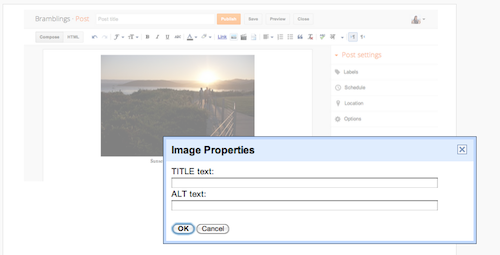
Image Properties.

Blogging is all about pictures. When was the last time you posted without a picture? How many posts have you put off until you had the right picture for your post? Right! Pictures are a big draw to blogs after all we like to look at stuff. Menus with no pictures are just no fun!

Every picture you add to a post should be attributed to your blog and its post.Why? Because search engines also search image files for keywords. This means that you will have to label your pictures.

After you insert your picture into your post, Click on it.

A Menu will pop up with options for the picture.

Select Properties.

Fill in the the boxes with the necessary text.


"Alt" attributes are meant to be a description of the image for users who are unable to view the image.

"title" attribute can be used for providing longer descriptions about the image.

Should look like this
Image properties box


Header tags

Good headings express the general idea of the content below them, and search engines use headings to get an idea of what your post is about so use them!

And they look good and people like them, so its a win, win for everyone :)


I hoped this helped. I have a few more things to say on the matter, but I don't want this post to go on forever so Check back soon :)


Thanks for Visiting, If you liked this post please Like & Share. Please Leave me a comment it lets me know your there, leave your link behind :) Don't for forget to follow this blog! www.interwebschic.com

Sunday

Your Blog and the Google Adsense Privacy Policy

Okay, so I have been place adsense ads on my blog since the beginning of my blogging. And I have to admit those are some ugly freaking ads, but they help keep you in the game.

Recently I noticed that they weren't there anymore, just a blank space where the ad should be.
I was confused and worried, but I didn't get an email saying I was an evil doer or anything like that so I let it go and said it will fix itself, well it didn't.


I searched Google for two days and send them an email and they sent me to Google Groups which is like the mother of all message boards and anything that has ever gone wrong with Google is there, if your toilet won't flush while you're using chrome there is a  forum about it.

Ever wonder why you always see things on the sidebar of a blog or YouTube that either interest you or have something to do with a recent search you did? Well this is what Google adsense uses in form of a cookie and they aren't the only ones that do it, any form of advertising online is done with a cookie involved. Now we all have the option to disable this feature at anytime, but to cover the law Google and you need this Privacy Policy stated somewhere on your site or blog.

Anyhoo, come to find out Google and all their wonderment has a Privacy Issue that needs to be addressed anywhere their ads show, Blogs, websites, etc..

Google Says:
"You must have and abide by an appropriate privacy policy that clearly discloses that third parties may be placing and reading cookies on your user’s browser, or using web beacons to collect information, in the course of ads being served on your website. Your privacy policy should also include information about user options for cookie management."

Update: 23 March 2009 
We have now updated the Google Adsense Privacy Policy Generator to include a mention about the DoubleClick DART cookie, which is now required by Google to be included in your privacy policy.

You can read more about the DoubleClick DART Cookie on the following link ... https://www.google.com/adsense/support/bin/answer.py?answer=100557&sourceid=aso


So the only way to fix this is to do two things depending on how you have your blog setup.

The two steps depend on whether you have your own domain name or blogspot.com

If your domain ends in Blogspot.com

Create a Privacy Policy Page.

If your domain is personal .com

Create a Privacy Policy Page. And let Adsense know the new domain, apply again it takes a few days for the ads to be back up.

There is a site that generates a Privacy Policy for you and its pretty easy, I used it myself.
You can see my Privacy Policy here http://www.themakeupsquid.com/p/privacy-policy.html

You can either copy or paste mine and change what is needed, I added shareasale because they didn't give me the option to add it to mine, so if you are showing banners for someone else you have to list all of your advertising sources.

You can visit the site with this link http://www.serprank.com/privacy-policy-generator/

If your are having problems with your ads showing on your blog, there has been some confusion on the interwebs about this. If you recently switched to a personal domain name other than blogspot.com you will have to let adsense know that is was switched over.

I hope this helped in some way, If you have any problems or just need help let me know in the comments below or any social medias.


Thanks for Visiting, If you liked this post please Like & Share. Please Leave me a comment it lets me know your there, leave your link behind :) Don't for forget to follow this blog! www.interwebschic.com

Thursday

Ticked Off Thursday!


Well, its Thursday and as you can tell I am ticked off!

I am going to share with you the things that tick me off and being an interwebs chic.

Blog following

It ticks me off when people visit a blog and ask for a follow or sub, then say if you follow me I will follow you back. WTF is that? Most bloggers follow back whoever follows them, at least I do. So follow the blog and get followed back! Don't make me jump through hoops to follow you. make it easy and all will be well.

Maybe I am just lazy, but going through my emails is way easier then having to search the net for you to follow you! And most smart phones don't show the follow button when viewing from your phone. But if you follow the blogger will get notified and click the link to follow back. So simple, so nice.

Blog Wars

WTF is this! we are not on a playground anymore fighting for a swing. I know you have to be aggressive to get ahead, but come on this is just mental. I don't see how this makes any sense or benefits anyone. The way I see it is like this. We blog about our passions and hope that one day we can do what we are passionate about for a living, right? Well so is everyone else! Now If I have a group of friends and one is finally getting somewhere and making a name for themselves and I am going to bash them? NO! why? because this person is a colleague of mine and if they mention me or TAG me or anything on their way up, I get some PR work done for free and everyone wins! I am truly happy for my friend and I get a mention hear and there. No harm, no foul. So be nice to people they may pass you by or take you with them on the way up.

Giveaways

I am all for a good giveaway and I do enter many of them. But what ticks me off about them are the people who enter them.  the rules in any giveaway are to Follow, subscribe, like and tweet so far. But people are unsubbing and unfollowing after the giveaway is up! SO all that hard work all that networking is for nothing!

Now, I know that if the giveaway host is someone I wont follow after the giveaway I wont enter plain and simple. I enter because I like you and what your giveaway. A lot of times my blog friends have giveaways and I don't enter, not to be a bitch but, to give someone a chance that doesn't know them or their blog, YouTube channel a chance, what I will do it tweet about it and share the giveaway but not enter.

I know their are more things that tick me off but I cant think of them right now, so I will save them for next time.


Thanks for Visiting, If you liked this post please Like & Share. Please Leave me a comment it lets me know your there, leave your link behind :) Don't for forget to follow this blog! www.interwebschic.com